MOMO BOARD Community Super App5.3.0
Publisher Description
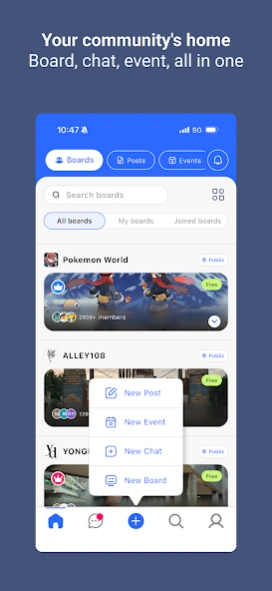
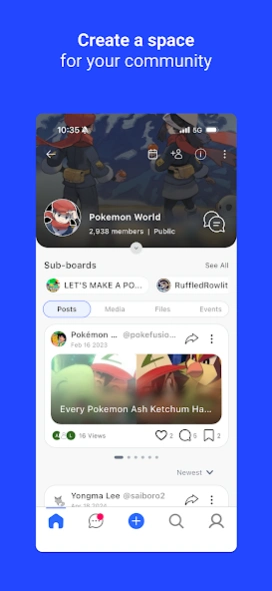
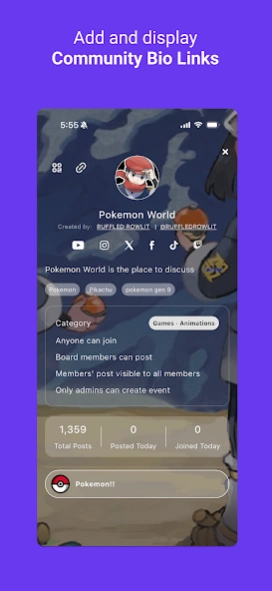
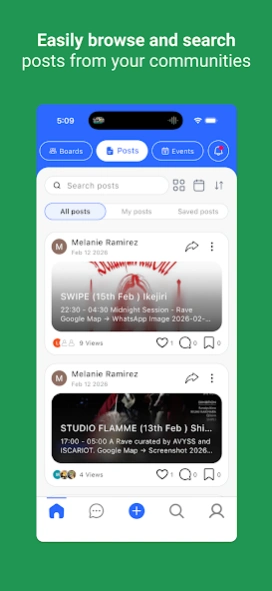
Your community's home - Boards, chat, events, and monetization, all in one app.
MOMO BOARD is the all-in-one community super-app for creators, brands, and communities of every kind.
Whether you're a creator building your fan club or a community leader keeping your group connected — MOMO BOARD gives you everything you need in one beautifully simple platform.
Built on message boards. Not group chat.
Your community deserves a real home — a place where every conversation is organized by topic, permanently archived, and always searchable. That's the idea behind MOMO BOARD. Unlike chat-first platforms where discussions get buried and lost in endless threads, MOMO BOARD is built around structured message boards with rich communication tools and full member management. Your community's memory lives on. And when you need real-time conversation, group chat is right there too.
Community Boards and Sub-Boards
Create a main community and organize conversations with sub-boards by topic, subject, or interest. Every post is permanently archived and easy to find — no more scrolling through cluttered chat history.
Real-Time Messaging
Chat one-on-one or in groups. Share files, images, and videos instantly — wherever you are.
Cloud Storage
10GB of free personal cloud storage per account owner. Upload, archive, and retrieve files anytime. Nothing gets lost.
Community Calendar and Events
Plan ahead with a shared community calendar. Host online or in-person events — free or ticketed — and manage everything from within your community.
Member Management and Admin Tools
Full control over your community. Set privacy settings, block members, delete posts, designate co-admins, and manage your team with ease.
Analytics and Insights
Understand your community with a built-in dashboard and analytics.
Web3 Ready
Connect your crypto wallet (MetaMask, Phantom) and create token or NFT-gated communities on Ethereum, Solana, and Polygon.
Key Features:
* Topic-based message boards with permanent archiving
* Sub-boards for each subject or interest
* Rich text editor for posts and messages (bold, italic, links, bullet points, and more)
* Community calendar and event creation (free or ticketed)
* Full member management tools (block, delete, co-admin)
* Public or private community settings
* Polls and questionnaires
* 10GB free personal cloud storage per account owner
* 1:1 and group chat rooms
* Unlimited posts and members
Perfect for:
* Creators and influencers building a paid fan club
* Teams and organizations streamlining group communication
* IP and brand fandoms looking for a dedicated home
* Web3 communities managing token-gated access
Creators and community leaders don't need more tools — they just need one home.
About MOMO BOARD Community Super App
The company that develops MOMO BOARD Community Super App is Momo Networks, Inc.. The latest version released by its developer is 5.3.0.
To install MOMO BOARD Community Super App on your Android device, just click the green Continue To App button above to start the installation process. The app is listed on our website since 2026-10-03 and was downloaded 20 times. We have already checked if the download link is safe, however for your own protection we recommend that you scan the downloaded app with your antivirus. Your antivirus may detect the MOMO BOARD Community Super App as malware as malware if the download link to com.momolocal.en is broken.
How to install MOMO BOARD Community Super App on your Android device:
- Click on the Continue To App button on our website. This will redirect you to Google Play.
- Once the MOMO BOARD Community Super App is shown in the Google Play listing of your Android device, you can start its download and installation. Tap on the Install button located below the search bar and to the right of the app icon.
- A pop-up window with the permissions required by MOMO BOARD Community Super App will be shown. Click on Accept to continue the process.
- MOMO BOARD Community Super App will be downloaded onto your device, displaying a progress. Once the download completes, the installation will start and you'll get a notification after the installation is finished.
Program Details
System requirements
Download information
Pricing
Version History
version 5.3.0
posted on 2026-10-03
- A refreshed post editor: a steadier layout with the keyboard up, and menus in your language.
- Connect a podcast RSS feed from your board settings.
- Clearer, consistent dates and times; events show in their own time zone.
- Event creation date, instant filter updates across tabs.
version 5.2.8
posted on 2026-09-16
- Clearer, more stable event content display (fixed comment/sheet issues; improved formatting, tables, and video rendering)
- New podcast features, board RSS connection, episode cards, and show-note link previews
- Notification improvements, read notifications now clear automatically; iOS background delivery supported
- Fixed an app-closing crash and improved thumbnail quality
- Various fixes and performance improvements across chat, boards, audio, and uploads
version 5.2.6
posted on 2026-08-15
- Upload progress now shows in real time, with instant retry if it fails
- Event attendees can auto-join the board and be assigned as co-hosts
- Images and profile photos now appear in notifications and chat
- Fixed various bugs for a more stable experience
version 5.2.5
posted on 2026-08-01
Fixed ticket purchase page transition error
version 5.2.3
posted on 2026-07-22
- Brand-new post editor
- Video downloads from post details
- Various bug fixes
- Performance upgrades
version 5.2.2
posted on 2026-06-06
- Fixed an issue where the app would crash when scrolling through chat history
- Fixed a display issue when tapping the FAQ, Terms of Service, or Privacy Policy tabs in the profile
- Fixed an issue where search keywords would reset and incorrect results would be displayed
- Improved performance and memory management
version 5.2.1
posted on 2026-05-16
- Performance and memory improvements
- Stability enhancement and Various Bug fixes
- Push related issues
version 5.2.0
posted on 2026-04-18
- Profile view upgrade
- Chat view upgrade
- Member list
- Various bug fixes
version 5.1.2
posted on 2026-04-06
- Video playing error
- Event list loading error
- Various bug fixes
version 5.0.1
posted on 2026-03-16
- Brand new design
- Various bug fixes
- Performance improvements
- Board Setting: Allow staff admin to create and edit sub-boards
- Event Option: Hide registered attendees
